![ASD_icon_4c.png]](https://knowledgebase.agrispraydrones.com/hs-fs/hubfs/ASD_icon_4c.png?width=50&height=50&name=ASD_icon_4c.png)
Autel Evo Max 4T XE Altitude Settings
Key Steps:
1. Set Maximum Altitude
-
Access the Max 4T 'Settings' menu.
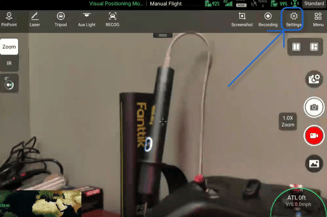
- Select 'Flight' on the right side.
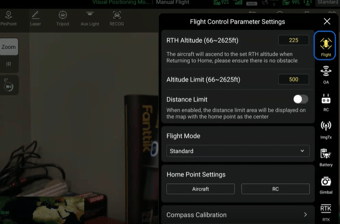
-
Locate the Altitude Limit section.
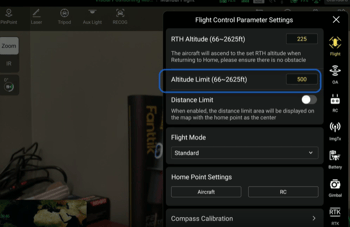
-
Set the maximum altitude to your desired limit to ensure safety during operations.
2. Understand Takeoff Point Reference
-
Recognize that the altitude is measured from the takeoff point, NOT above the terrain the drone is flying over. Example: (If you set an altitude max at 400 ft, but your take off point is on elevated terrain or a hill, when you fly off of the elevated terrain, your limit may actually be 500 ft due to the altitude being set from your take off location.)
-
Ensure that your takeoff point is accurately set to avoid exceeding altitude limits unintentionally.
3. Use Rangefinder for Accurate Measurements.
-
Utilize the Max 4T rangefinder to measure distances to the ground accurately will allow you to check the current altitude of the drone.
-
Confirm that the altitude setting is appropriate for the terrain you are surveying.
4. Adjust Altitude for Safety
-
Be prepared to adjust altitude above 400 feet if necessary for safety.
-
Ensure the drone can avoid obstacles and navigate safely during operations.
5. Performing Inspections Above Structures
-
When conducting roof inspections or similar tasks, adjust altitude settings as needed to safely operate above buildings.
Cautionary Notes
-
Always verify the takeoff point before launching the drone to avoid altitude miscalculations.
-
Be aware of surrounding air traffic and adjust altitude accordingly to maintain safety.
Tips for Efficiency
-
Regularly check and calibrate the rangefinder to ensure accurate distance measurements.
-
Familiarize yourself with the drone's settings before operations to streamline the adjustment process.
Stay Informed: Subscribe to the Agri Spray Drones Newsletter
How to Subscribe
Subscribing is easy and takes less than a minute:
-
Visit Our Website
Go to www.agrispraydrones.com -
Scroll to the Bottom of the Homepage
Look for the “Subscribe to Our Newsletter” section. -
Enter Your Email Address
Type in the email address where you'd like to receive updates. -
Click “Subscribe”
Once you submit, you’ll be added to our mailing list and will start receiving valuable updates straight to your inbox.
Don’t Miss Out
Join thousands of ag professionals who trust Agri Spray Drones for the latest in drones, drone spraying, and precision ag.
Subscribe today — and let us help you take your operation to the next level.