![ASD_icon_4c.png]](https://knowledgebase.agrispraydrones.com/hs-fs/hubfs/ASD_icon_4c.png?width=50&height=50&name=ASD_icon_4c.png)
Thermal Calibration Procedure
Key Steps
1. Accessing Thermal Settings
-
Power on the Autel Max4T drone.
-
Navigate to the thermal settings by selecting the IR option.
-
Click on the camera settings icon located on the right side.
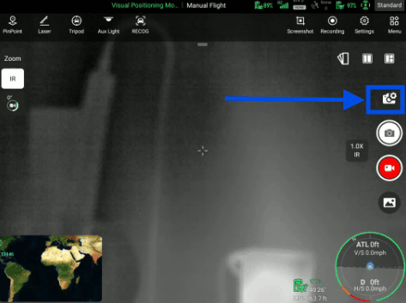
2. Adjusting Temperature Measurement Settings
-
Ensure the temperature measurement is set to 'Custom'.
-
Adjust the temperature range to accommodate current conditions (e.g., set lower than 400 degrees in winter).
-
Use the mode option to find a middle range that automatically adjusts based on surroundings.
3. Calibration and Default Settings
-
After making adjustments, check the calibration settings.
-
If you wish to revert to default settings, turn off the temperature measurement and manually reset it.
4. Additional Recommendations
-
For optimal performance, keep the temperature measurement on 'Auto'.
-
Regularly check and adjust settings based on environmental conditions.
Cautionary Notes
-
Be cautious when adjusting temperature ranges; incorrect settings may lead to inaccurate readings.
-
Always revert to default settings if unsure about custom adjustments.
Tips for Efficiency
-
Regularly review and adjust settings based on seasonal changes to maintain accuracy.
-
Familiarize yourself with the drone's auto settings to minimize manual adjustments.
Stay Informed: Subscribe to the Agri Spray Drones Newsletter
How to Subscribe
Subscribing is easy and takes less than a minute:
-
Visit Our Website
Go to www.agrispraydrones.com -
Scroll to the Bottom of the Homepage
Look for the “Subscribe to Our Newsletter” section. -
Enter Your Email Address
Type in the email address where you'd like to receive updates. -
Click “Subscribe”
Once you submit, you’ll be added to our mailing list and will start receiving valuable updates straight to your inbox.
Don’t Miss Out
Join thousands of ag professionals who trust Agri Spray Drones for the latest in drone spraying and precision ag.
Subscribe today — and let us help you take your operation to the next level.