![ASD_icon_4c.png]](https://knowledgebase.agrispraydrones.com/hs-fs/hubfs/ASD_icon_4c.png?width=50&height=50&name=ASD_icon_4c.png)
1. Go to the website "web.eavtechus.com/wxCrm/#/"
This is where you manage all your data for your EAV account.

Click Here to go to the website
2. Log in with your user and password.
From your Home screen, you will be able to see your operation overview, which includes:
- Date of operation
- Operation Area in Acreage
- Time of Operation
- Capacity applied in Gallons.
- Spreader Capacity applied in Pounds
(Picture Shown Below).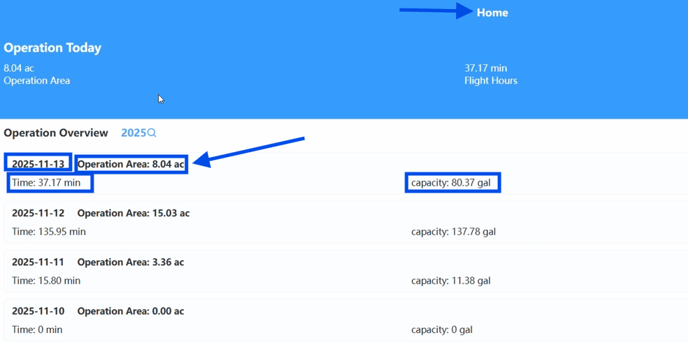
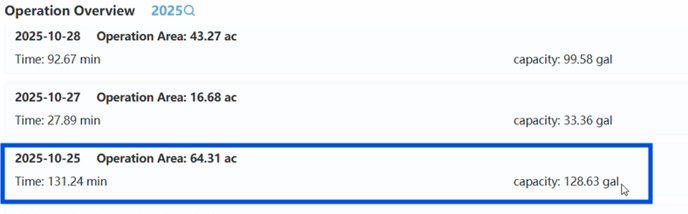
3. Select The Desired Operation you want to share
- Click on the desired operation.
(Picture Shown Below).
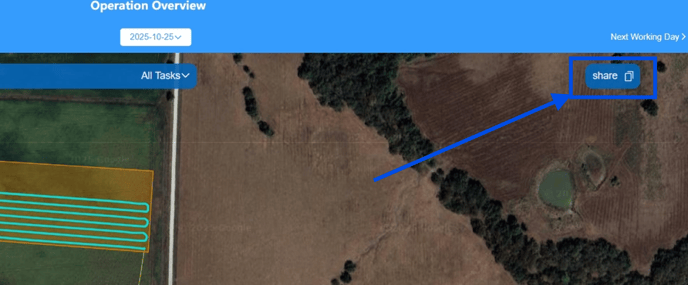
4. Select the Share Button (This will copy this URL web address for you to send the link to whomever you wish to share this specific operation with).
(Picture Shown Below).
5. Paste the copied link and send it to the individual being shared with.
Stay Informed: Subscribe to the Agri Spray Drones Newsletter
How to Subscribe
Subscribing is easy and takes less than a minute:
-
Visit Our Website
Go to www.agrispraydrones.com -
Scroll to the Bottom of the Homepage
Look for the “Subscribe to Our Newsletter” section. -
Enter Your Email Address
Type in the email address where you'd like to receive updates. -
Click “Subscribe”
Once you submit, you’ll be added to our mailing list and will start receiving valuable updates straight to your inbox.
Don’t Miss Out
Join thousands of ag professionals who trust Agri Spray Drones for the latest in drone spraying and precision ag.
Subscribe today — and let us help you take your operation to the next level.