![ASD_icon_4c.png]](https://knowledgebase.agrispraydrones.com/hs-fs/hubfs/ASD_icon_4c.png?width=50&height=50&name=ASD_icon_4c.png)
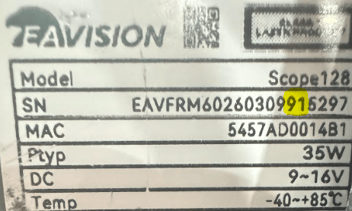
Step 1. Record the serial number on the side of your lidar (highlighted numbers are the model)
Step 2. Connect to your drone and go to the Smart Ag 60 app
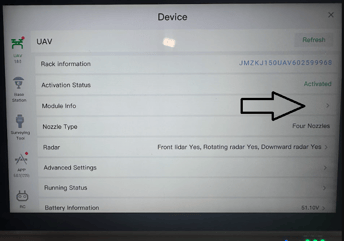
Step 3. Navigate to Devices
Step 4. Find module info
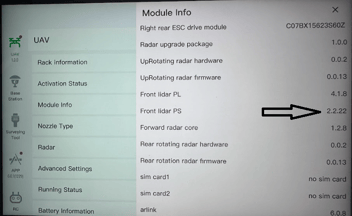
Step 5. Record the Front Lidar PS version number
If you have questions about the compatibility of the firmware on your lidar, please contact ASD technical support: (573) 306-2818
Stay Informed: Subscribe to the Agri Spray Drones Newsletter
How to Subscribe
Subscribing is easy and takes less than a minute:
- Visit Our Website
Go to www.agrispraydrones.com - Scroll to the Bottom of the Homepage
Look for the “Subscribe to Our Newsletter” section. - Enter Your Email Address
Type in the email address where you'd like to receive updates. - Click “Subscribe”
Once you submit, you’ll be added to our mailing list and will start receiving valuable updates straight to your inbox.
Don’t Miss Out
Join thousands of ag professionals who trust Agri Spray Drones for the latest in drone spraying and precision ag.
Subscribe today — and let us help you take your operation to the next level.