![ASD_icon_4c.png]](https://knowledgebase.agrispraydrones.com/hs-fs/hubfs/ASD_icon_4c.png?width=50&height=50&name=ASD_icon_4c.png)
Key Steps
1. Power the Drone Down Completely Before Touching the Spray Bus
- Turn off the main battery.
- Unplug the internal battery (CPU)
- Confirm the drone is fully powered down. Do not connect or disconnect spray bus plugs with the CPU live.
2. Identify the EMF Connector
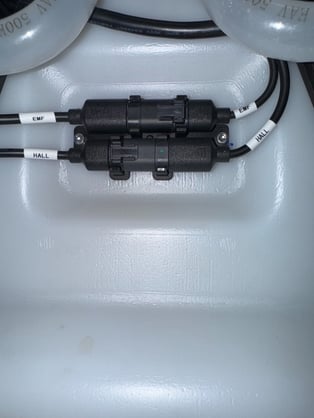
- Trace the cable back to the electromagnetic flow meter on the spray plumbing to confirm which connector you are holding. (labeled EMF)
3. Identify the Hall Connector
- Trace the cable back to the Hall sensor to confirm which connector you are holding. (labeled HALL)
4. Identify the Matching Ports on the Spray Bus
- Locate the spray bus and identify the EMF port and the Hall port before plugging anything in.
5. Seat Each Connector in Its Own Port
- Connect the EMF cable to the EMF port and the Hall cable to the Hall port.
- Seat each plug fully until it locks.
- The two connectors will physically fit either port, so a plug that seats correctly is not proof that it is in the right place.
6. Verify Both Connections Before Restoring Power
- Trace both cables one more time, sensor to port, before you turn anything on.
- Have a second person confirm the two connections if one is available.
- Never power on the drone to "test" whether the connectors are in the right ports. Powering on with them reversed is what causes the damage.
7. Power On and Confirm the Flow Reading
- Power on the CPU and main battery.
- Confirm the spray system reports a normal flow reading on the remote controller.
8. If the Drone Was Already Powered On With the Connectors Reversed
- Shut the drone down and leave it off.
- Do not power cycle repeatedly to see whether the fault clears.
- Contact Agri Spray Drones support before any further troubleshooting so the CPU can be evaluated.
Cautionary Notes
- A reversed EMF/Hall connection shorts the CPU. Replacement of the CPU is the repair path, not a reset or a calibration.
- Label or photograph the spray bus before you disconnect anything, so you are not identifying connectors from memory during reassembly.
- Never connect or disconnect spray bus plugs while the CPU is powered.
- Do not force a connector. If it does not seat cleanly, stop and confirm you have the right port.
Tips for Efficiency
- Photograph the spray bus with all connectors seated before any teardown. That photo is the fastest reference during reassembly.
- Tag the EMF and Hall cables with tape and a marker as you disconnect them.
- Disconnect and reconnect one connector at a time rather than pulling the whole bus apart at once.
Stay Informed: Subscribe to the Agri Spray Drones Newsletter
How to Subscribe
Subscribing is easy and takes less than a minute:
- Visit Our Website
Go to www.agrispraydrones.com - Scroll to the Bottom of the Homepage
Look for the “Subscribe to Our Newsletter” section. - Enter Your Email Address
Type in the email address where you'd like to receive updates. - Click “Subscribe”
Once you submit, you'll be added to our mailing list and will start receiving valuable updates straight to your inbox.
Don't Miss Out
Join thousands of ag professionals who trust Agri Spray Drones for the latest in drone spraying and precision ag.
Subscribe today — and let us help you take your operation to the next level.