![ASD_icon_4c.png]](https://knowledgebase.agrispraydrones.com/hs-fs/hubfs/ASD_icon_4c.png?width=50&height=50&name=ASD_icon_4c.png)

Remote Controller LEDs Meaning
Status LED on the RC
Flashes Red = Abnormal Image transmission initialization
Solid Red = Remote controller not linked
Alternating red-green flashing = Linking remote controller
Flashes Green = Remote controller linked but not connected to drone or communication repeater
Solid Green = Remote controller linked and connected to drone or communication repeater
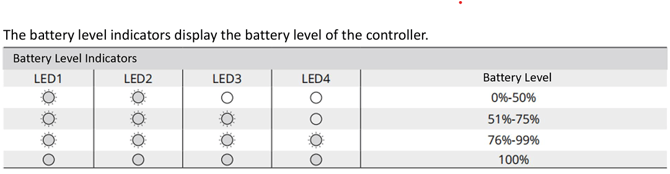
Battery Level Indicators LEDs on RC
consists of four status lights showing the battery level of the remote controller.
All four LEDs on Solid = 100% Battery Level
Four LEDs on = 76%-99% Battery Level
Three LEDs on = 52-75% Battery Level
Two LEDs on = 0%-50% Battery Level
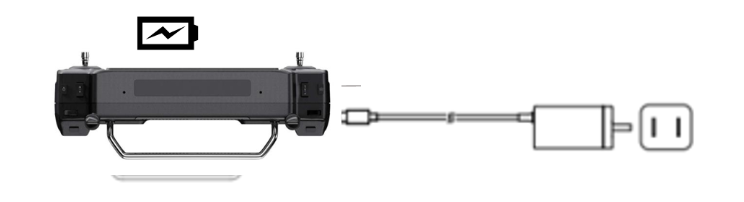
Charging The Battery of the RC
Charging the battery with the original power adapter when the remote controller is powered off.
1. Use Type-C fast charging cable to connect the remote controller and adaptor.
2. The Battery Level LEDs flash when charging.
3. The battery Level LEDs turn solid green when fully charged.
Quick Notes:
- Please use original charger.
- The Battery will deplete when stored for an extended period of time. Recharge the battery at least once every three months to prevent over discharging.
Click Here for "How To Link The EAV J100 To The Remote Controller"
Stay Informed: Subscribe to the Agri Spray Drones Newsletter
-
Visit Our Website
Go to www.agrispraydrones.com -
Scroll to the Bottom of the Homepage
Look for the “Subscribe to Our Newsletter” section. -
Enter Your Email Address
Type in the email address where you'd like to receive updates. -
Click “Subscribe”
Once you submit, you’ll be added to our mailing list and will start receiving valuable updates straight to your inbox.
Don’t Miss Out
Join thousands of ag professionals who trust Agri Spray Drones for the latest in drone spraying and precision ag.
Subscribe today — and let us help you take your operation to the next level.