![ASD_icon_4c.png]](https://knowledgebase.agrispraydrones.com/hs-fs/hubfs/ASD_icon_4c.png?width=50&height=50&name=ASD_icon_4c.png)
J150/ J70 Spreader Settings Overview:
1. Clear Tank Functionality
-
Access the clearance option to completely empty the tank.
-
Use the 'clear tank' button to initiate the emptying process.
-
You can stop the process at any time if needed.
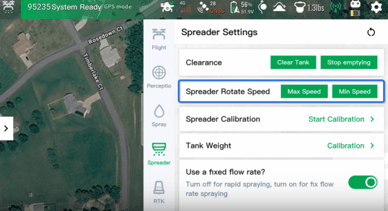
2. Adjust Spreader Rotation Speed
-
Locate the spreader rotation speed setting.
-
Quickly toggle between maximum and minimum disc speed as required.
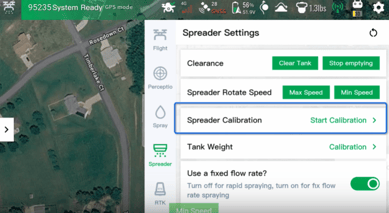
3. Calibrate Spreader
-
Use the spreader calibration feature to create templates for different materials.
-
Ensure that the calibration matches the material being spread.
Click Here for an article on performing a Spreader Calibration
4. Tank Weight Calibration
-
Perform tank weight calibration, which is standard for both spray and spreading tanks.
Click Here for an article on Performing a tank weight calibration.
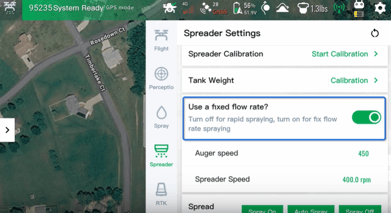
5. Set Fixed Flow Rate
-
Manually adjust the auger speed and disc speed using the fixed flow rate setting.
6. Control Spreader Operation
-
Use the spread control feature to manually turn the spreader on and off.
7. Monitor Spreader Readings
-
Check the following readings from the spreader:
-
Disk shaker speed
-
Voltage and current
-
Auger speed
-
Shortage speed
-
Voltage and current
-
Total spreading weight.
-
8. Configure Spray Box Empty Detection
-
Toggle the spray box empty detection on or off.
-
Choose to rely on:
-
Load cells only
-
MSD motor only
-
Both options.
-
Cautionary Notes
-
Always ensure that the spreader is properly calibrated for the specific material being used to avoid uneven spreading.
-
Regularly check the voltage and current readings to prevent equipment damage.
Tips for Efficiency
-
Familiarize yourself with the spreader settings before operation to reduce setup time.
-
Keep a log of calibration settings for different materials to streamline future operations.
Stay Informed: Subscribe to the Agri Spray Drones Newsletter
How to Subscribe
Subscribing is easy and takes less than a minute:
-
Visit Our Website
Go to www.agrispraydrones.com -
Scroll to the Bottom of the Homepage
Look for the “Subscribe to Our Newsletter” section. -
Enter Your Email Address
Type in the email address where you'd like to receive updates. -
Click “Subscribe”
Once you submit, you’ll be added to our mailing list and will start receiving valuable updates straight to your inbox.
Don’t Miss Out
Join thousands of ag professionals who trust Agri Spray Drones for the latest in drone spraying and precision ag.
Subscribe today — and let us help you take your operation to the next level.