![ASD_icon_4c.png]](https://knowledgebase.agrispraydrones.com/hs-fs/hubfs/ASD_icon_4c.png?width=50&height=50&name=ASD_icon_4c.png)
Note: You have to land your drone to make changes to the Route Spacing
Changing Route Spacing
Steps:
-
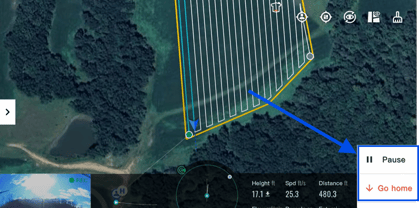
Select 'Pause' and then select ' Go home.'
(If the drone is already landed, skip this and start at the next step).
-
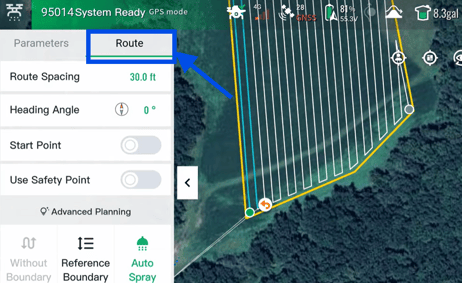
Once the drone is on the ground, go to 'Route.'
-
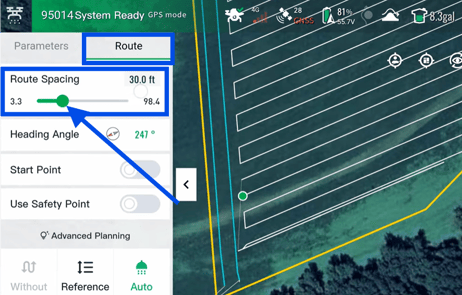
Under route, select 'Route Spacing' and slide the bar left or right to adjust the route spacing by feet.
-
Select 'Confirm' when the desired route spacing has been adjusted.
(The new flight route spacing has now been changed.)
Stay Informed: Subscribe to the Agri Spray Drones Newsletter
How to Subscribe
Subscribing is easy and takes less than a minute:
-
Visit Our Website
Go to www.agrispraydrones.com -
Scroll to the Bottom of the Homepage
Look for the “Subscribe to Our Newsletter” section. -
Enter Your Email Address
Type in the email address where you'd like to receive updates. -
Click “Subscribe”
Once you submit, you’ll be added to our mailing list and will start receiving valuable updates straight to your inbox.
Don’t Miss Out
Join thousands of ag professionals who trust Agri Spray Drones for the latest in drone spraying and precision ag.
Subscribe today — and let us help you take your operation to the next level.