![ASD_icon_4c.png]](https://knowledgebase.agrispraydrones.com/hs-fs/hubfs/ASD_icon_4c.png?width=50&height=50&name=ASD_icon_4c.png)
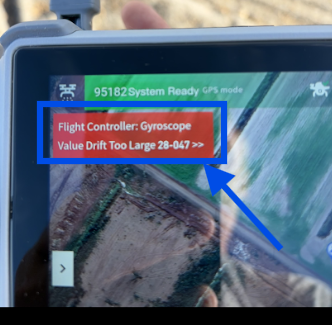
With This Error, your drone will NOT be able to take off. Please follow the steps below to resolve this issue.
How to fix this error video
IF YOU RECEIVE THE FOLLOWING ERROR:
Flight Controller Gyroscope Value Drift Too Large (28-047)
(Your Drone Will Not Take Off With This Error)
Complete the steps below to resolve the error and get your drone back in the air
Key Steps
1. Adjust The Drone Orientation
-
Turn the drone away from north or east, positioning it to face west.
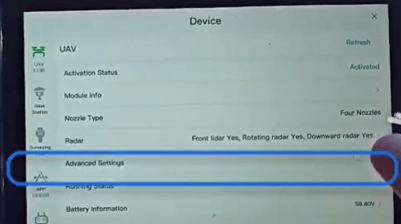
2. Access Advanced Settings
-
From the home screen of the remote controller (RC).
-
Navigate to 'Device'.

-
Scroll down under UAV and Select 'Advanced Settings'.
3. Start Gyroscope Calibration
-
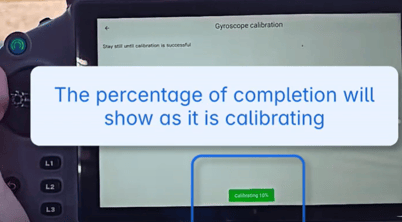
Under 'Gyroscope', select 'Start Calibration' and then select 'Confirm'.

-
Ensure the drone remains still during the entire calibration process.
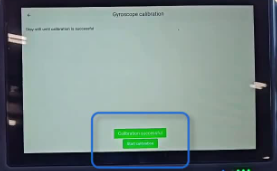
4. Confirm Calibration Success
-
Look for a 'Calibration Successful' message to confirm the process worked.
5. Shut down the Drone, Internal and External Battery
-
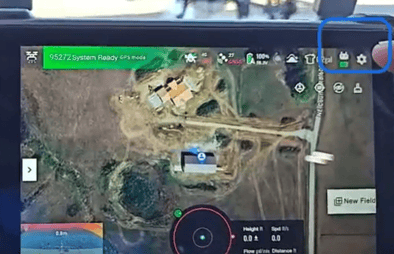
Back out to the main menu, select 'Auto.'
- Select Settings (gear icon)
-
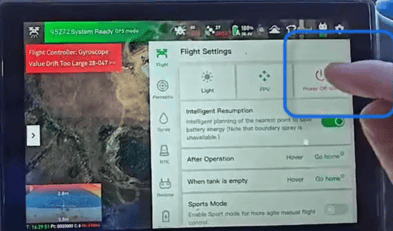
Select 'Turn off main'(Battery)
- Select 'Turn Off', this is the internal battery(CPU)
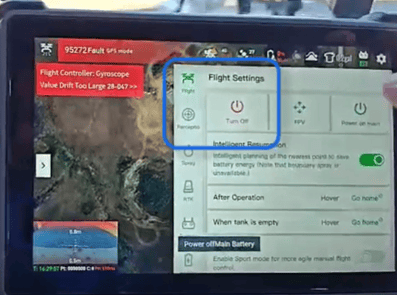
- Once selected, a countdown will begin of 40 seconds to complete internal shut down.

- Once the shutdown is complete, follow the steps below.
6. Power On the Drone
-
Power on the CPU and main battery to reboot.
7. Verify Successful Calibration
-
Check to ensure that the error message is gone.
The drone should now be ready for takeoff.
Cautionary Notes
-
Ensure the drone is on a stable surface during calibration to avoid errors.
-
Do not move the drone during the calibration process to ensure accuracy.
Tips for Efficiency
-
Keep the drone's firmware updated to minimize calibration issues.
Click Here for the most recent J150 Firmware versions
Stay Informed: Subscribe to the Agri Spray Drones Newsletter
How to Subscribe
Subscribing is easy and takes less than a minute:
-
Visit Our Website
Go to www.agrispraydrones.com -
Scroll to the Bottom of the Homepage
Look for the “Subscribe to Our Newsletter” section. -
Enter Your Email Address
Type in the email address where you'd like to receive updates. -
Click “Subscribe”
Once you submit, you’ll be added to our mailing list and will start receiving valuable updates straight to your inbox.
Don’t Miss Out
Join thousands of ag professionals who trust Agri Spray Drones for the latest in drone spraying and precision ag.
Subscribe today — and let us help you take your operation to the next level.