![ASD_icon_4c.png]](https://knowledgebase.agrispraydrones.com/hs-fs/hubfs/ASD_icon_4c.png?width=50&height=50&name=ASD_icon_4c.png)
Definitions:
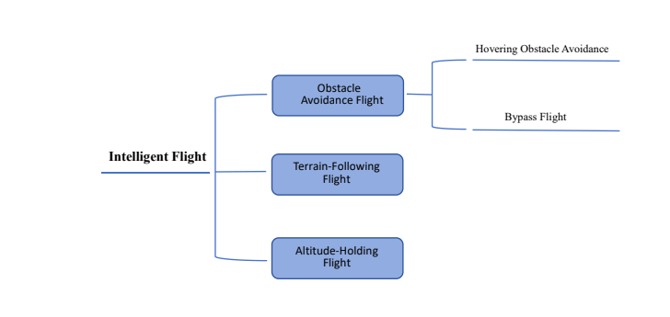
Obstacle Avoidance: All methods to avoid colliding with obstacles.
Hovering Obstacle Avoidance: Hovering in front of a detected obstacle.
Bypass Flight: Bypassing obstacles from the left or right side.
Terrain-Following Flight: The drone always maintains a certain relative height from whatever is beneath it. (Example: If the terrain following is set at 10 feet flying over a corn field, it will be 10 feet from the top of the corn crops, which could be 16 or 17 feet from the ground. The drone will climb or drop to maintain 10 feet above whatever the drone reads beneath it.)
Altitude-Holding Flight: The drone always flies at a constant height from the take-off or home point. This is based on whatever the drone is taking off of. (Example: If the drone is taking off from the trailer, which is 8 feet off the ground, and the fixed altitude is set at 30 feet, the drone will rise to 30 feet from its current location. Which would be 38 feet from the ground, and hold that height for the flight.)
Important: When sensors such as the Lidar or Radars are dirty or damaged will cause abnormal obstacle avoidance and terrain following, affecting its flight performance. Ensuring they are clean should be part of your pre-flight checks.
Click Here for J150 Pre Flight Checks
J150 (Detection System) LASER COMPUND-EYE VISION SYSTEM.
The J150 is equipped with a laser compound-eye vision system composed of a front laser radar (Lidar), an upper rotating radar, and a rear rotating radar. By utilizing both Lidar, Front Radar, and Rear Radar, spherical detection all the way around the drone is accomplished.
(Lidar)Front Laser Radar Sensing Range: Horizontal direction 70°, vertical direction 120°; effective detection distance 80 meters.
360° 4D Imaging Upper Rotating Radar Sensing Range: Horizontal direction 360°, vertical direction 140°; effective detection distance 60 meters.
360° 4D Imaging Rear Rotating Radar Sensing Range: Horizontal direction 50°, vertical direction 270°; effective detection distance 60 meters.
Click Here for article on J150 Terrain following & terrain and obstacle reading on RC
- Top / Front Radar
(Front Radar provides detection on the front and above the drone.)
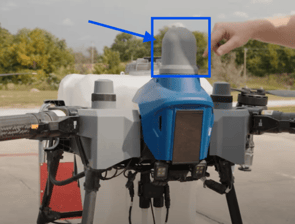
The front radar is attached to the front radar mounting bracket.
The Radar gets signal to the CPU through the top radar signal cable, which on one side is plugged in under the radar, and the other side is plugged in directly to the CPU.
Click Here for a J150 Front Radar
Click Here for a J150 Top Radar signal cable
- Forward-looking Lidar.
(Lidar provides forward horizontal and vertical laser detection.)
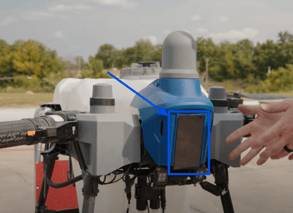
The Lidar is connected directly to the CPU and the FPV through the FPV Perception System line.
and is mounted to the perception board bracket, which attaches to the front of the drone.
Click Here for a J150 Forward-looking Lidar
Click Here for a J150 FPV Perception System Line
Click Here for a J150 Perception Board Bracket
- Rear Radar
(Rear Radar provides detection horizontally and vertically underneath, and to the rear of the drone.)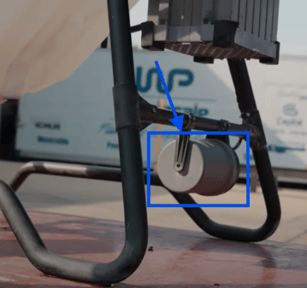
The rear radar is attached by two separate brackets: the rear radar bracket and the rear radar bracket shaft.
The rear radar gets a signal to the CPU through the rear radar line, which on one side is plugged into the side of the radar, and the other side is plugged in directly to the CPU.
Click Here for a J150 Rear Radar
Click Here for a J150 Rear Radar Line
Front Radar Bracket. Rear Radar Bracket. Rear Radar Bracket Shaft.
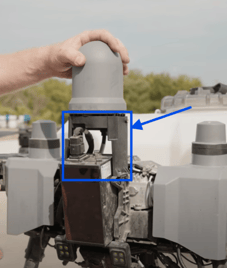
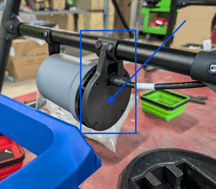
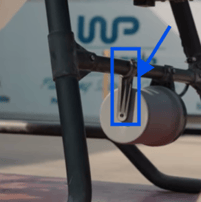
Click Here for J150 Front Radar Bracket.
Click Here for J150 Rear Radar Bracket.
Click Here for J150 Rear Radar Bracket Shaft.
Click Here for the article on Replacing/ Installing the J150 Rear Radar
Click Here for the article on Replacing/ Installing the J150 Top/ Front Radar
Click Here for the article on Replacing/ Installing the J150 Lidar
Stay Informed: Subscribe to the Agri Spray Drones Newsletter
How to Subscribe
Subscribing is easy and takes less than a minute:
-
Visit Our Website
Go to www.agrispraydrones.com -
Scroll to the Bottom of the Homepage
Look for the “Subscribe to Our Newsletter” section. -
Enter Your Email Address
Type in the email address where you'd like to receive updates. -
Click “Subscribe”
Once you submit, you’ll be added to our mailing list and will start receiving valuable updates straight to your inbox.
Don’t Miss Out
Join thousands of ag professionals who trust Agri Spray Drones for the latest in drone spraying and precision ag.
Subscribe today — and let us help you take your operation to the next level.