![ASD_icon_4c.png]](https://knowledgebase.agrispraydrones.com/hs-fs/hubfs/ASD_icon_4c.png?width=50&height=50&name=ASD_icon_4c.png)
Spray Settings Overview for the J150 Drone:
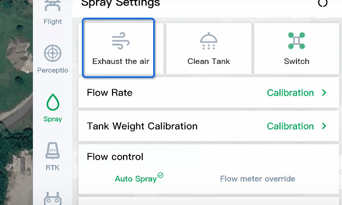
1. Clear Trapped Air
-
Use the Exhaust Air function to clear any trapped air out of the lines before starting the spray operation.
2. Clean Tank Function
-
Activate the Clean Tank Function to empty the tank through the nozzles, ensuring no residual chemicals remain.
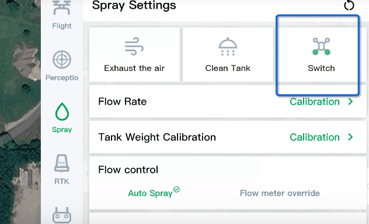
3. Switch Nozzle Configuration
-
Use the Switch Button to toggle between using two or four nozzles based on your spraying needs.
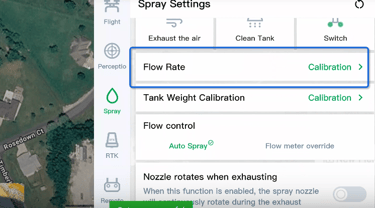
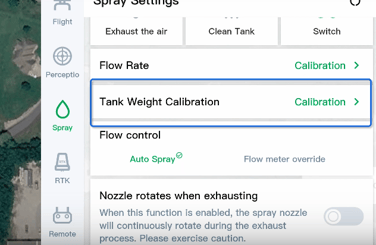
4. Calibrate Flow Rate and Tank Weight
-
Perform Flow Rate Calibration and Tank Weight Calibration to ensure accurate measurements during operation.
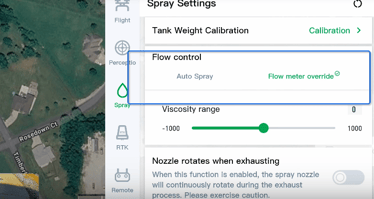
5. Adjust Flow Control
-
Utilize Flow Control to override the flow meter and manually input viscosity settings as required.
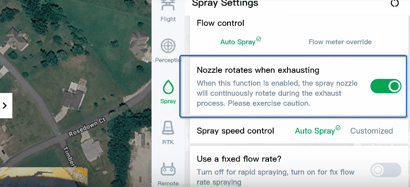
6. Enable Nozzle Rotation During Exhaust
-
Turn on the Nozzle Rotates When Exhausting feature to ensure the disk spins during air exhaust.
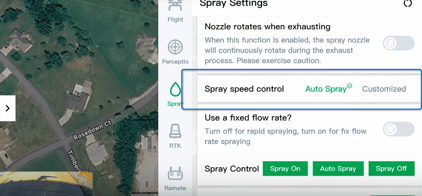
7. Set Spray Speed Control
-
Adjust the Spray Speed Control to manually set the speed of the discs for optimal spraying.
8. Toggle Fixed Flow Rate
-
Activate Fixed Flow Rate if needed, and manually adjust droplet size and flow rate accordingly.
9. Control Spray Activation
-
Use the Spray Control to turn the spray on or off as necessary.
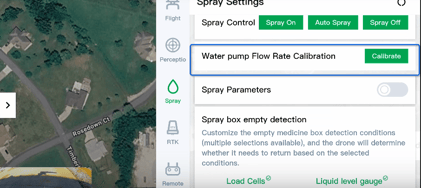
10. Calibrate Water Pump Flow Rate
-
Perform Water Pump Flow Rate Calibration to ensure the pump operates at the correct flow rate.
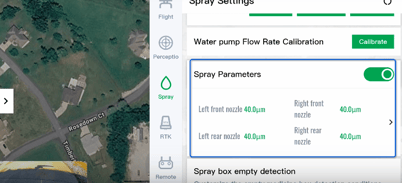
11. Adjust Spray Parameters
-
Modify the Spray Parameters to adjust the micron size for each individual nozzle.
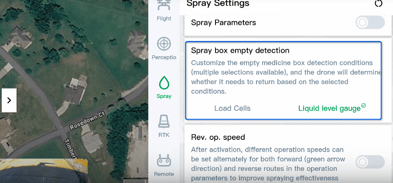
12. Set Spray Box Empty Detection
-
Toggle the Spray Box Empty Detection to choose between load cells or liquid level gauge for detecting an empty tank.
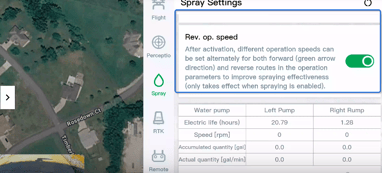
13. Configure Reverse Operation Speed
-
Set the Reverse Operation Speed to define different speeds for reverse operations.
14. Monitor System Readings
-
Regularly check the readings from the spray system, including pump hours, speed, gallons, and disk RPMs.
Cautionary Notes
-
Always ensure that the tank is clean before starting the operation to avoid contamination.
-
Double-check all calibrations before use to ensure accurate spraying.
Tips for Efficiency
-
Familiarize yourself with the location of each control to minimize setup time.
-
Regularly maintain the drone and its components to ensure optimal performance.
Stay Informed: Subscribe to the Agri Spray Drones Newsletter
How to Subscribe
Subscribing is easy and takes less than a minute:
-
Visit Our Website
Go to www.agrispraydrones.com -
Scroll to the Bottom of the Homepage
Look for the “Subscribe to Our Newsletter” section. -
Enter Your Email Address
Type in the email address where you'd like to receive updates. -
Click “Subscribe”
Once you submit, you’ll be added to our mailing list and will start receiving valuable updates straight to your inbox.
Don’t Miss Out
Join thousands of ag professionals who trust Agri Spray Drones for the latest in drone spraying and precision ag.
Subscribe today — and let us help you take your operation to the next level.