![ASD_icon_4c.png]](https://knowledgebase.agrispraydrones.com/hs-fs/hubfs/ASD_icon_4c.png?width=50&height=50&name=ASD_icon_4c.png)
Spray Upgrade Package Procedure for J70 and J150 Drones
Key Steps:
Step 1: Access Device Menu
-
Power on the drone.
-
Navigate to the device menu.
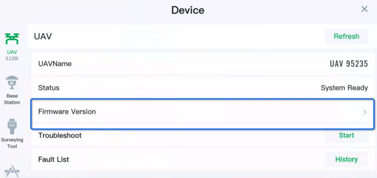
Step 2: Firmware Version
-
Select 'Firmware Version' from the device menu.
Step 3: Spray Package Upgrade
-
Look for the 'Upgrade' button next to the spray upgrade package.
-
Click on the 'Upgrade' button.
Step 4: Select Upgrade Version
-
If upgrades are available, a list of versions will appear.
-
Choose the most current version from the list
-
Select 'Upgrade' to start the process.
Cautionary Notes
-
Ensure the drone is fully charged before starting the upgrade process.
-
Do not turn off the drone during the upgrade to avoid potential damage.
Tips for Efficiency
-
Regularly check for firmware updates to ensure optimal performance.
-
Keep a log of upgrade versions for future reference.
Stay Informed: Subscribe to the Agri Spray Drones Newsletter
How to Subscribe
Subscribing is easy and takes less than a minute:
-
Visit Our Website
Go to www.agrispraydrones.com -
Scroll to the Bottom of the Homepage
Look for the “Subscribe to Our Newsletter” section. -
Enter Your Email Address
Type in the email address where you'd like to receive updates. -
Click “Subscribe”
Once you submit, you’ll be added to our mailing list and will start receiving valuable updates straight to your inbox.
Don’t Miss Out
Join thousands of ag professionals who trust Agri Spray Drones for the latest in drone spraying and precision ag.
Subscribe today — and let us help you take your operation to the next level.