![ASD_icon_4c.png]](https://knowledgebase.agrispraydrones.com/hs-fs/hubfs/ASD_icon_4c.png?width=50&height=50&name=ASD_icon_4c.png)
Note: For those who have wired the J150 Charger, the process is nearly identical
Wiring for a single 50 AMP Plugs
Steps:
1. Gather Materials
-
Obtain the charger with an 8-foot lead and two big blue ends.
-
Ensure you have the smaller adapters for the blue ends.
2. Identify Wires
-
Locate the wires on the adapter: Grey, Blue, and Black.
-
Wire Identification: Blue is ground, Grey and Black are hot wires.
-
Remove the face of the 50-amp plug to access the prongs.
4. Understand Plug Configuration
-
Identify the prongs:
-
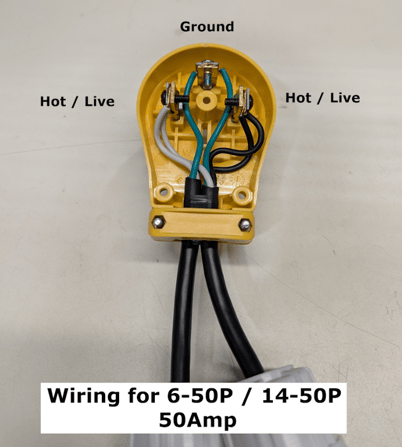
The Top prong is the ground.
-
The two side prongs are hot.
-
5. Wire the Ground Connection
-
Feed both pig tails into the plug.
-
Take the (Ground) blue wires, one from each pigtail, and connect them to the top prong (ground prong).
-
Tighten the screw to secure the ground connection.
6. Wire the Hot Connections
-
Take the (Hot/Live) black wires, one from each pigtail, and connect them to the right side prong. Put both blacks together.
-
Tighten the screw to secure the connection.
- Take the (Hot/Live) grey wires, one from each pigtail, and connect them to the left side prong. Put both grey together.
-
Tighten the screw to secure the connection.
7. Check Connections
-
Ensure the connections are secure: ground, hot, hot.
-
Perform a slight tug test.
(Your plug should be wired like the picture below.)
8. Assemble the Plug
- Resecure the plug face back, covering the wires and prong connection.
9. Connect to Generator
-
Insert the adapters into the plug, ensuring the larger pins are aligned.
-
Plug the charger into the generator.
Wiring for two 30-AMP plugs
Steps:
1. Gather Materials
-
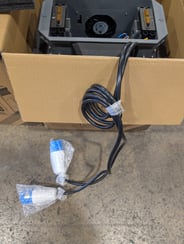
Obtain the charger with an 8-foot lead and two big blue ends.
-
Ensure you have the smaller adapters for the blue ends.
2. Identify Wires
-
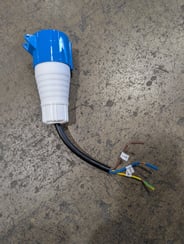
Locate and Identify the wires on the adapter: blue (Ground), white (Hot), and black (Hot).
-
Remember: blue is ground, white and black are hot wires.
-
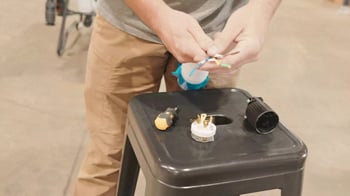
Remove the face of the 30-amp plug to access the prongs.
4. Understand Plug Configuration
-
Identify the prongs:
-
L-shaped prong is ground (green screw).
-
Two larger prongs are hot (gold screws).
-
Do not use the smaller top prong (neutral).
-
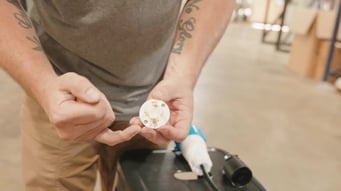
5. Wire the Ground Connection
-
Feed the blue wire into the ground port of the plug.
-
Tighten the set screw to secure the connection.
6. Wire the Hot Connections
-
Insert one of the hot wires (white or black) into one of the hot ports and tighten.
-
Repeat for the second hot wire.
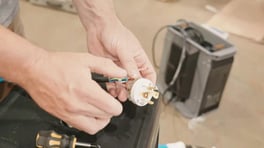
7. Check Connections
-
Ensure the connections are secure: ground, hot, hot. and nothing on the neutral
8. Assemble the Plug
-
Slide the collar up through the wires and align screw holes.
-
Secure the collar and replace the top screws.
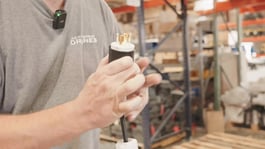
9. Finalize Wiring
-
Optionally, trim wire ends for a better fit or use electrical tape for insulation.
10. Repeat
- Repeat steps 1-9 for the second 30-amp plug.
11. Connect to Generator
-
Insert the adapters into the plug, ensuring the larger pin (ground) is aligned.
-
Plug the charger into the generator.

Stay Informed: Subscribe to the Agri Spray Drones Newsletter
How to Subscribe
Subscribing is easy and takes less than a minute:
-
Visit Our Website
Go to www.agrispraydrones.com -
Scroll to the Bottom of the Homepage
Look for the “Subscribe to Our Newsletter” section. -
Enter Your Email Address
Type in the email address where you'd like to receive updates. -
Click “Subscribe”
Once you submit, you’ll be added to our mailing list and will start receiving valuable updates straight to your inbox.
Don’t Miss Out
Join thousands of ag professionals who trust Agri Spray Drones for the latest in drone spraying and precision ag.
Subscribe today — and let us help you take your operation to the next level.