![ASD_icon_4c.png]](https://knowledgebase.agrispraydrones.com/hs-fs/hubfs/ASD_icon_4c.png?width=50&height=50&name=ASD_icon_4c.png)
How to complete a tank weight calibration on the J150
Key Steps
Step 1: Power On the Drone
-
Ensure the drone is fully powered on before starting the calibration process.
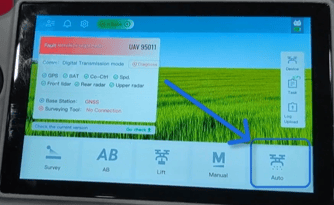
Step 2: From the Home screen, select 'Auto' Mode
-
Navigate to the 'Auto' mode on the drone's interface.
Step 3: Open Settings
-
Go to the top right corner of the screen and select the 'settings' (gear) icon to access the settings.
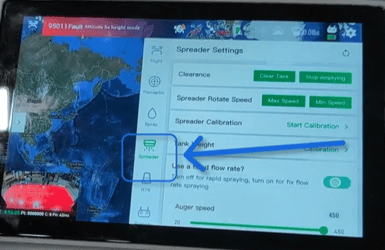
Step 4: Select Spreader Settings
-
Choose the 'spreader' option from the settings menu.
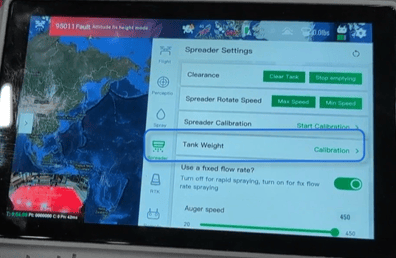
Step 5: Initiate Calibration
-
Locate the tank weight section and select the calibration option.
Step 6: Reset Weight
-
Lift the tank, ensuring that the tank is raised/ lifted off all the weight sensors.
(May need a co-worker to lift while you operate the remote control for the calibration).
If no co-worker is available, you may need to take the tank all the way out of the drone while you perform the weight reset. -
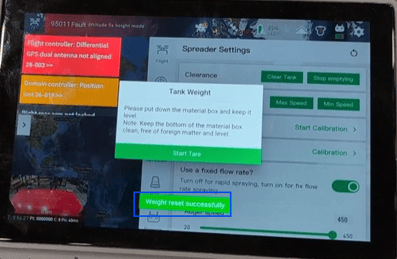
Once the tank is lifted or taken out, Press the 'reset weight' button. Wait for five seconds for the reset to complete.
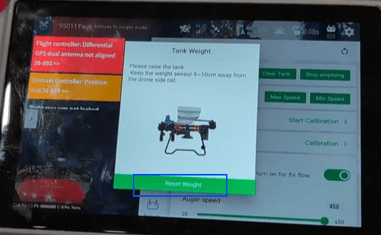
- Once 5 seconds are complete, you should get an indicator at the bottom of your remote controller screen that says 'weight reset successfully.'
Step 7: Lower the Tank
-
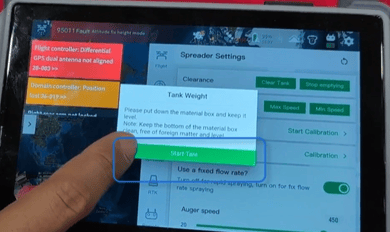
Lower the Tank back onto the weight sensors, ensuring the tank is seated correctly on all weight sensors.
-
Press the 'start tare' button and wait for another five seconds.
Step 9: Confirm Tare Success & Verify Weight Display
-
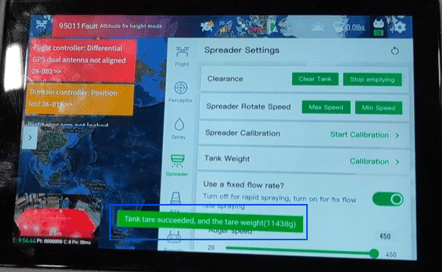
Ensure the Remote Controller screen display shows 'tare successful' indicator and indicates the grams measured.
-
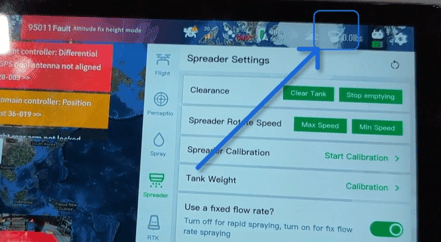
Check the top right of the screen, ensuring it shows '0.0 pounds' for the tank.
Cautionary Notes
-
Ensure that the weight sensors are free of any obstructions before starting the calibration process.
-
Do not rush the calibration steps; allow the system to complete each phase before proceeding to the next.
Products List:
Click Here for J150 Weight Sensor Module.
Click Here for J150 Weight Sensor Line.
Stay Informed: Subscribe to the Agri Spray Drones Newsletter
How to Subscribe
Subscribing is easy and takes less than a minute:
-
Visit Our Website
Go to www.agrispraydrones.com -
Scroll to the Bottom of the Homepage
Look for the “Subscribe to Our Newsletter” section. -
Enter Your Email Address
Type in the email address where you'd like to receive updates. -
Click “Subscribe”
Once you submit, you’ll be added to our mailing list and will start receiving valuable updates straight to your inbox.
Don’t Miss Out
Join thousands of ag professionals who trust Agri Spray Drones for the latest in drone spraying and precision ag.
Subscribe today — and let us help you take your operation to the next level.