![ASD_icon_4c.png]](https://knowledgebase.agrispraydrones.com/hs-fs/hubfs/ASD_icon_4c.png?width=50&height=50&name=ASD_icon_4c.png)
Remote Controller Indicators You need to know while operating the J150 RC

1. Status Light Indicator
- This light is the farthest to the left of the five little lights located just under the lower right corner of the RC screen.
- Constant Blue Light indicates No abnormality in the remote controller (RC is good)
- Red Light Flashing indicates Joystick disconnection
- Constant Red Light indicates Battery gauge communication abnormality
- Yellow Light Flashing indicates Battery temperature exceeds 55 degrees C
- Constant Yellow Light indicates Battery temperature exceeds 60 degrees C
2. RC Battery Level Indicator Lights
- These lights are the four right lights located just under the lower right corner of the RC screen and right beside the status indicator light.
- LED 1, LED 2 lights indicates 0%-50% Current battery Level of RC
- LED 1, LED 2, LED 3 lights indicate 51%-75% Current battery Level of RC
- LED 1, LED 2, LED 3, and LED 4 lights indicate 76%-99% Current battery Level of RC
- All four LED Lights on indicate 100% Current battery Level of RC (Fully Charged RC)
Quick Note: When the RC battery gets low, it should start beeping, giving you an audio alarm to pay attention to your battery level.
Click Here for an article on the RC Low Battery Alarm
3. Remote Controller (RC) Pairing indicator
On the Upper-Left corner of the J150 Remote Controller (RC) will have a light indicator showing the current status of the pairing of the remote controller.
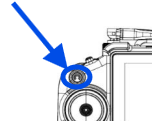
What these LED indicator lights signal:
- Red Light Flashing indicates Digital-image transmission initialization or abnormal
- Constant Red Light indicates Not Paired
Click Here for the article on how to pair RC to the Drone
- Red-Green Alternating indicates Pairing in progress
- Green Light Flashing indicates Paired, but not connected to the aircraft or the Extreme Link
- Constant Green Light indicates Paired and connected to the aircraft or Extreme Link Communication Station
If you have a Solid and constant Green light on your pairing button, you are good to go!
Stay Informed: Subscribe to the Agri Spray Drones Newsletter
How to Subscribe
Subscribing is easy and takes less than a minute:
-
Visit Our Website
Go to www.agrispraydrones.com -
Scroll to the Bottom of the Homepage
Look for the “Subscribe to Our Newsletter” section. -
Enter Your Email Address
Type in the email address where you'd like to receive updates. -
Click “Subscribe”
Once you submit, you’ll be added to our mailing list and will start receiving valuable updates straight to your inbox.
Don’t Miss Out
Join thousands of ag professionals who trust Agri Spray Drones for the latest in drone spraying and precision ag.
Subscribe today — and let us help you take your operation to the next level.