![ASD_icon_4c.png]](https://knowledgebase.agrispraydrones.com/hs-fs/hubfs/ASD_icon_4c.png?width=50&height=50&name=ASD_icon_4c.png)
Inputting k values into the system so the drone is set correctly.
Steps
1. Select 'settings'
2. Select 'spray settings'
3. Scroll to down, and select weight sensors.
4. Select 'advanced setting'
(This will bring up the picture shown below)
notice the numbers in the box- ensure they match the numbers on the weight sensors on the drone.
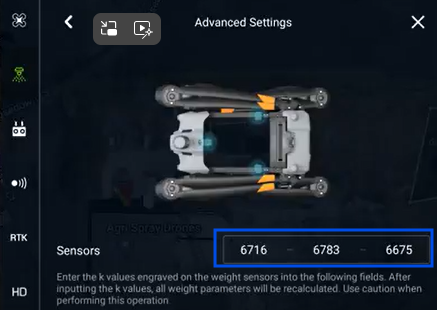
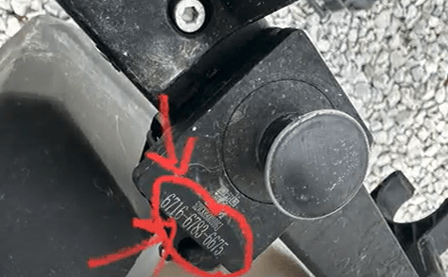
If the numbers do not match click on the box and input the correct numbers from the weight sensors.
Click 'Checkmark' then 'Ok' when complete to save.
Note: Once this is done you will need to do a Tare Calibration and a Weight Calibration.
Stay Informed: Subscribe to the Agri Spray Drones Newsletter
How to Subscribe
Subscribing is easy and takes less than a minute:
-
Visit Our Website
Go to www.agrispraydrones.com -
Scroll to the Bottom of the Homepage
Look for the “Subscribe to Our Newsletter” section. -
Enter Your Email Address
Type in the email address where you'd like to receive updates. -
Click “Subscribe”
Once you submit, you’ll be added to our mailing list and will start receiving valuable updates straight to your inbox.
Don’t Miss Out
Join thousands of ag professionals who trust Agri Spray Drones for the latest in drone spraying and precision ag.
Subscribe today — and let us help you take your operation to the next level.