![ASD_icon_4c.png]](https://knowledgebase.agrispraydrones.com/hs-fs/hubfs/ASD_icon_4c.png?width=50&height=50&name=ASD_icon_4c.png)
With this issue, the drone will still take off, but you will not be able to select your intended droplet size — and the application will not match the spray plan you built. Please follow the steps below to resolve this issue.
IF YOU SEE THE FOLLOWING:
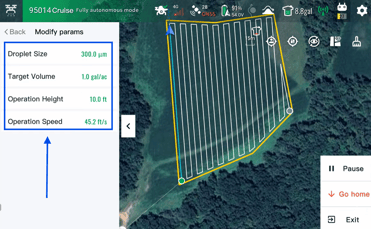
The droplet size (micron) range in the Smart Ag 60 app is limited, greyed out, or will not allow you to select your intended value. The range 40 - 500
Work through the steps below in order. Steps 1 through 4 are software checks and resolve most cases — complete them before moving to the arm wiring in Steps 5 and 6.
Key Steps
1. Perform a Hard Reset
Land the drone and stop the current task before you begin. Shut down the main battery, the internal CPU battery, and the remote, allow the internal shutdown to finish, then power the drone back on. Once the drone is back up, reopen the Smart Ag 60 app and check the micron range again before moving on.
2. Check Speed, Route Spacing, and Application Rate
Open the task or template settings in the Smart Ag 60 app and review your flight speed, route spacing, and application rate. These three values together determine the flow rate the atomizers have to deliver, and the app limits the selectable micron range to the droplet sizes that flow rate can actually produce. In other words, a narrowed range is often the app telling you the droplet size you want is not achievable at the parameters you have set.
Adjust one value at a time and watch the micron range after each change, rather than changing all three at once. If the range opens back up after an adjustment, the limit was your parameter combination and not a fault, and no further troubleshooting is needed.
3. Delete and Reinstall the Smart Ag 60 App
Write down your current templates and spray parameters before you start. With that recorded, delete the Smart Ag 60 app from the remote controller and reinstall it. (Current firmware) Log back in, reconnect to the drone, and check the micron range again. A reinstall clears a corrupted local configuration, which is a common cause of parameters displaying incorrectly even when the drone itself is healthy.
4. Refresh the UAV and CPU Firmware
Refresh both the UAV firmware and the CPU firmware. Reload the current version even if the drone already reports being up to date — the purpose here is to repair a partial or corrupted firmware load, which can leave the drone reporting its parameters incorrectly to the app. Keep the drone powered, stationary, and connected to stable internet for the entire update.
5. Inspect the Rear Arm Cable Wiring
If the range is still limited after the software steps, the problem is most likely in the signal path out to the rear arms. Power the drone down completely and remove the main battery before touching any connector. Unfold the rear arms and inspect the cable runs from the center body out to each arm, checking every connector for corrosion, moisture, bent or pushed-back pins, and proper seating. Unplug and reseat each connector as you go.
Then follow the cable along the arm, looking for chafing, pinch points at the fold joint, and any spot where the insulation has worn. Reconnect everything, power the drone up, and check the micron range once more. An intermittent connection on this run can let the drone fly and behave normally in every other respect while still limiting what the app will offer for droplet size, which is why this step is worth completing carefully rather than at a glance.
6. Replace the Rear Arm Signal Cable
With the drone still powered down and the main battery removed, disconnect the rear arm signal cable at both ends and remove it. Route the replacement cable along the same path as the original, keeping it clear of the arm fold joint so the new cable does not wear in the same place. Seat both connectors fully and confirm they are locked before restoring power.
7. Verify the Full Micron Range Is Available
Power the drone on, connect to the Smart Ag 60 app, and open your task settings. Confirm that you can select your intended droplet size across the full range, using the same speed, route spacing, and application rate that produced the limit originally. Run a short ground test of the atomizers to confirm they respond before you fly a paid acre.
The drone should now allow full droplet size selection and be ready to spray.
Cautionary Notes
Record your templates and spray parameters before deleting the app in Step 3. If they are stored locally on the remote controller, they will not come back after the reinstall.
Never disconnect or reconnect arm cabling with the main battery installed. Power the drone down fully and remove the battery first.
A limited micron range does not stop the drone from flying, and that is what makes it costly. If you spray without resolving it, the drone will apply at whatever droplet size the app allowed — not the one your plan called for.
If the range is still limited after replacing the rear arm signal cable, stop and contact ASD support rather than continuing to disassemble. Further teardown can affect your warranty coverage.
Tips for Efficiency
Work the steps in order. Steps 1 through 4 cost nothing but time and resolve the majority of cases, so confirm them before ordering a cable.
Write down the exact speed, route spacing, and application rate that reproduce the limit, along with the micron range the app does offer. This is the first thing ASD support will ask for.
Stay Informed: Subscribe to the Agri Spray Drones Newsletter
How to Subscribe
Subscribing is easy and takes less than a minute:
- Visit Our Website
Go to www.agrispraydrones.com - Scroll to the Bottom of the Homepage
Look for the “Subscribe to Our Newsletter” section. - Enter Your Email Address
Type in the email address where you'd like to receive updates. - Click “Subscribe”
Once you submit, you'll be added to our mailing list and will start receiving valuable updates straight to your inbox.
Don't Miss Out
Join thousands of ag professionals who trust Agri Spray Drones for the latest in drone spraying and precision ag.
Subscribe today — and let us help you take your operation to the next level.